Note: If He / She purchase that particular item they will get points which assign to that items.
Step 1:
Go to Loyalty -> Plans
Step 2:
Click on New

Step 3:
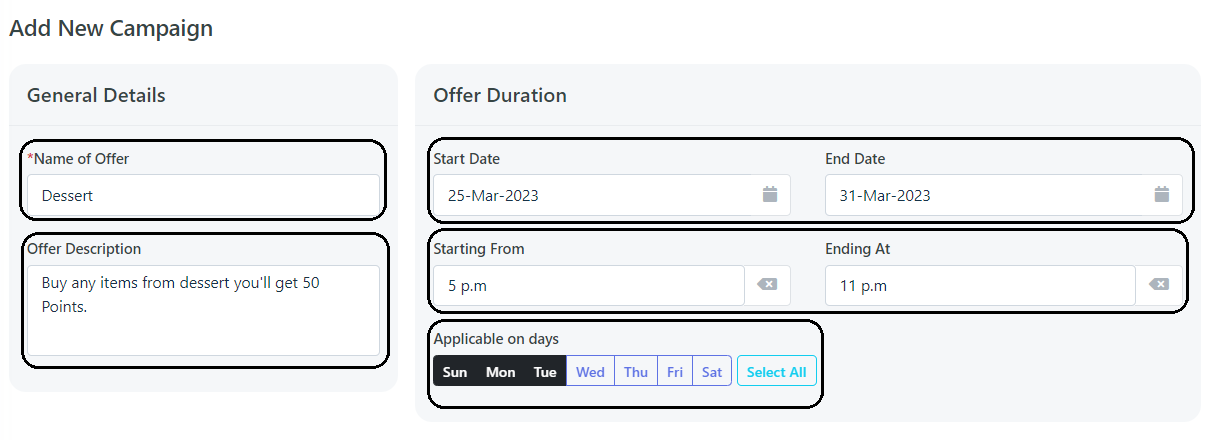
Add Offer Name -> Add Description -> Select Start & End Date (Ex: 1 Jan to 31 Jan) -> Select timings in which plan to be shown (Ex: 5PM to 7PM) -> Select Applicable days (Ex: Monday , Tuesday , Wednesday)
Step 4:
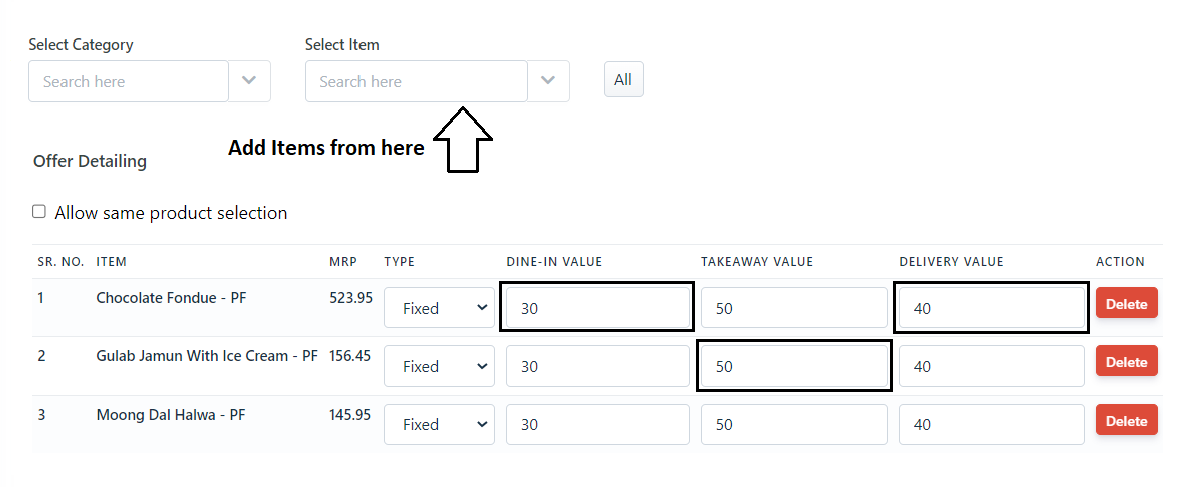
Select Items (Add Items in which you have to give points) -> Add points in Dine in , Takeaway , Delivery (Ex: If you give 30 points in DINE IN , 40 Points in DELIVERY , 50 Points in TAKEAWAY).
Step 5:
Click on Save Button.
Was this article helpful?
That’s Great!
Thank you for your feedback
Sorry! We couldn't be helpful
Thank you for your feedback
Feedback sent
We appreciate your effort and will try to fix the article