Follow this steps to create variations.
* Go to Menu
* Go to Variations
* Click on New
* Enter the Variation Name (Eg: Half - Full , Small - Large)
* Click on Save.
Follow this step to create variations items and assigned them.
Step 1:- Create Main Product
* Go to Menu
* Go to Items
* Click on new
* Select Item Type (Sales) -> Select Food Type (Food / Bar) -> Select Veg/Non-Veg/Egg if you have selected Food.
* Add Variant Product Name in which you want variations (Eg. Paneer Cheese Pizza)
* Select category (Eg. Pizza)
* Select Unit (Eg. Piece)
* Select Save.
Step 2:- Create Addons Items for Variations
* Create new Item.
* Select Item Type (Addons) -> Select Food Type (Food / Bar) -> Select Veg/Non-Veg/Egg if you have selected Food.
* Add Addon name which you have you assign in the variant product. (Eg. Paneer Cheese Pizza Medium)
* Select Category (Eg. Pizza)
* Select Unit (Eg. Piece)
* Enter Price of the product.
* Click on Save
Step 3:- Assign Addon item into main product
* Search the main product. (Eg. Paneer Cheese Pizza)
* Edit Item.
* Scroll Down and Click on add new variations (Eg. If you want to add 2 variatians click 2 times)
* After Clicking On variation it will be open like this.
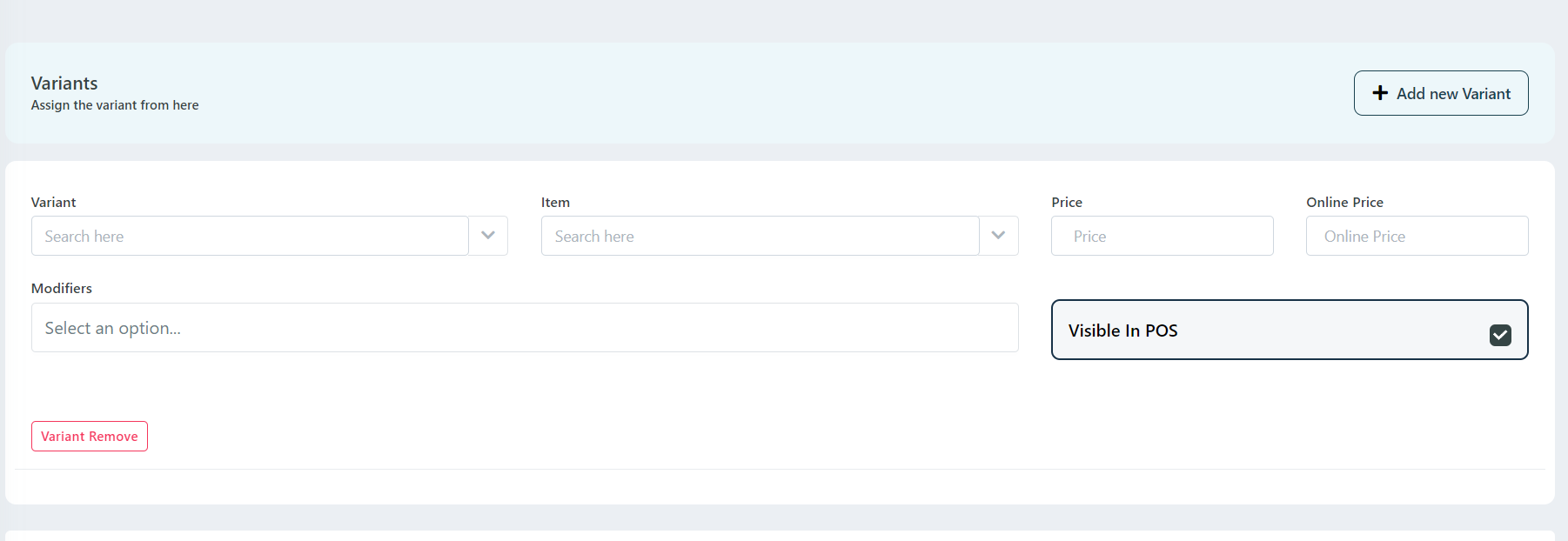
* Add Variant (Eg. Medium)
* Select Addon Item Name we have created (Eg. Paneer Cheese Pizza Medium)
* Add POS price and Add Online Price for Zomato and swiggy.
* Select Modifiers if there is any modifiers.
* There is an option (Visible in POS) (Eg. This Variation will not be shown to POS but shown to online) this option will work on this case.
* Click on Save.
Was this article helpful?
That’s Great!
Thank you for your feedback
Sorry! We couldn't be helpful
Thank you for your feedback
Feedback sent
We appreciate your effort and will try to fix the article